
A Paper Size in Pixels Converter
Welcome to the most accurate A Paper Size in Pixels Converter. Whether you are setting up a document in Photoshop, designing a web banner, or preparing a file for print, this tool helps you convert standard ISO 216 paper sizes (A0–A10) into exact pixel dimensions based on your resolution (DPI/PPI).
Quick Reference: Most Common A-Series Sizes
If you are looking for the standard dimensions for the most popular paper sizes, use this quick guide.
A4 Paper Size in Pixels
A4 is the standard paper size used worldwide for documents, letters, and magazines.
-
For Printing (300 DPI):
2480 x 3508 pixels -
For Screen/Web (72 DPI):
595 x 842 pixels -
For Average Quality (150 DPI):
1240 x 1754 pixels
A3 Paper Size in Pixels
A3 is double the size of A4, often used for posters, diagrams, and drawings.
-
For Printing (300 DPI):
3508 x 4961 pixels -
For Screen/Web (72 DPI):
842 x 1191 pixels
Why Resolution (DPI) Matters
You cannot define a paper size in pixels without knowing the DPI (Dots Per Inch). Physical paper (inches/mm) and digital screens (pixels) work differently. The “DPI” value tells the converter how many pixels to pack into every inch of paper.
-
300 DPI (High Quality Print): This is the industry standard for printing. If you are designing a brochure, flyer, or business card, always set your resolution to 300 DPI to avoid blurry images.
-
72 DPI or 96 DPI (Screen/Web): This is the standard for monitors and websites. Use this low resolution only if your image will live on a screen and never be printed.
-
150 DPI (Draft/Newspaper): Good for simple home office printing or newspapers where high-gloss quality isn’t required.
A Paper Sizes In inches and Millimeters
This is a list for paper sizes commonly used in inches and millimeters.
| A Paper Size | inches | Millimeters |
|---|---|---|
| A0 | 33.1 x 46.8 inches | 841 x 1189 mm |
| A1 | 23.4 x 33.1 inches | 594 x 841 mm |
| A2 | 16.5 x 23.4 inches | 420 x 594 mm |
| A3 | 11.7 x 16.5 inches | 297 x 420 mm |
| A4 | 8.3 x 11.7 inches | 210 x 297 mm |
| A5 | 5.8 x 8.3 inches | 148 x 210 mm |
| A6 | 4.1 x 5.8 inches | 105 x 148 mm |
| A7 | 2.9 x 4.1 inches | 74 x 105 mm |
| A8 | 2 x 2.9 inches | 52 x 74 mm |
| A9 | 1.5 x 2 inches | 37 x 52 mm |
| A10 | 1 x 1.5 inches | 26 x 37 mm |
| 2A0 | 46.8 x 66.2 inches | 1189 x 1682 mm |
| 4A0 | 66.2 x 93.6 inches | 1682 x 2378 mm |
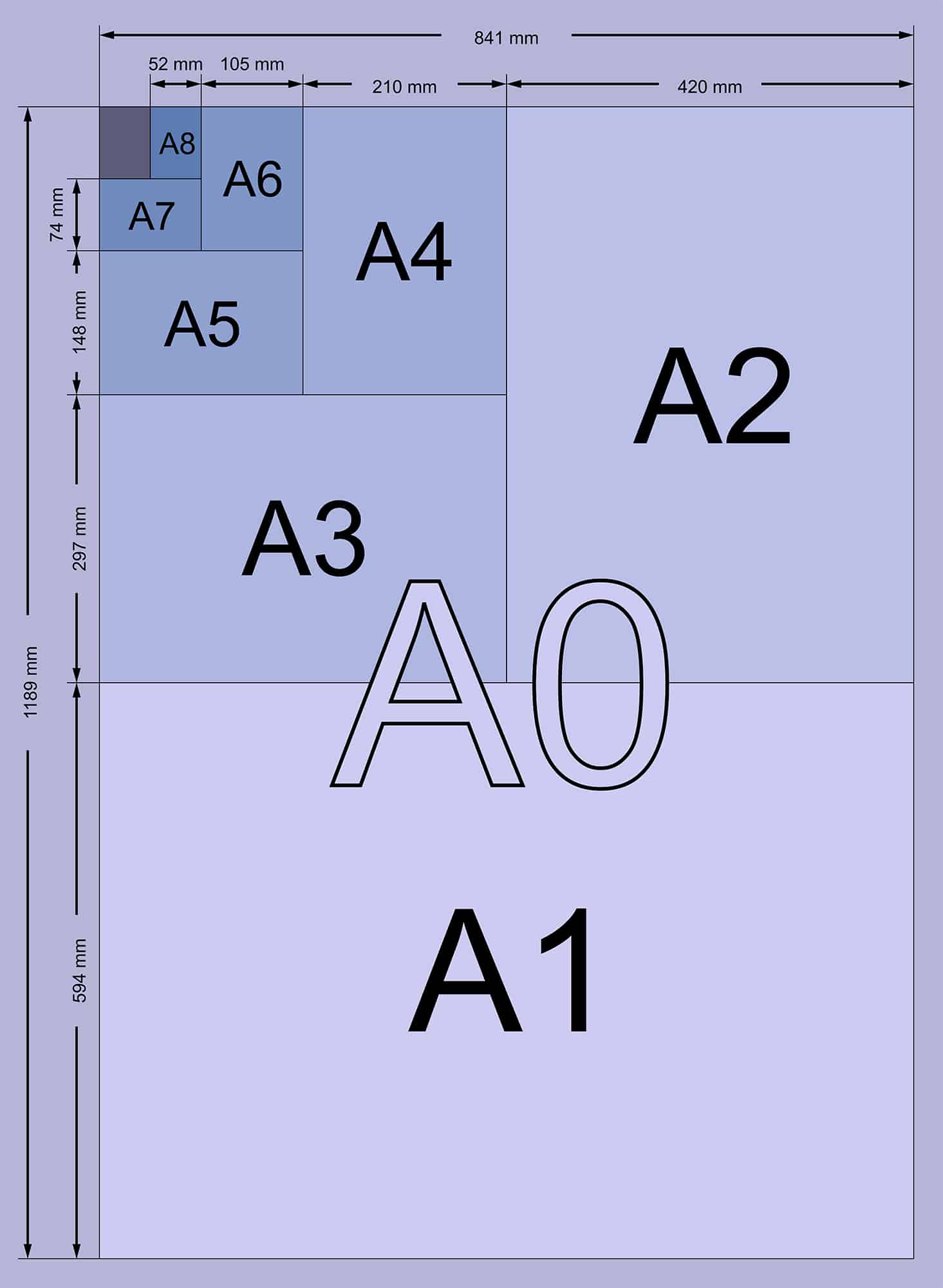
A Paper Sizes At Common Resolutions
This is a list for A paper sizes in pixels at most common resolutions (72, 96, 125 and 300)
| A Paper Size | 72 DPI | 96 DPI | 150 DPI | 300 DPI |
|---|---|---|---|---|
| A0 | 2384 x 3370 px | 3179 x 4494 px | 4967 x 7022 px | 9933 x 14043 px |
| A1 | 1684 x 2384 px | 2245 x 3179 px | 3508 x 4967 px | 7016 x 9933 px |
| A2 | 1191 x 1684 px | 1587 x 2245 px | 2480 x 3508 px | 4960 x 7016 px |
| A3 | 842 x 1191 px | 1123 x 1587 px | 1754 x 2480 px | 3508 x 4960 px |
| A4 | 595 x 842 px | 794 x 1123 px | 1240 x 1754 px | 2480 x 3508 px |
| A5 | 420 x 595 px | 559 x 794 px | 874 x 1240 px | 1748 x 2480 px |
| A6 | 298 x 420 px | 397 x 559 px | 620 x 874 px | 1240 x 1748 px |
| A7 | 210 x 298 px | 280 x 397 px | 437 x 620 px | 874 x 1240 px |
| A8 | 147 x 210 px | 197 x 280 px | 307 x 437 px | 614 x 874 px |
| A9 | 105 x 147 px | 140 x 197 px | 219 x 307 px | 437 x 614 px |
| A10 | 74 x 105 px | 98 x 140 px | 154 x 219 px | 307 x 437 px |
| 2A0 | 3370 x 4768 px | 4494 x 6357 px | 7022 x 9933 px | 14043 x 19866 px |
| 4A0 | 4768 x 6741 px | 6357 x 8988 px | 9933 x 14043 px | 19866 x 28087 px |
Explore Other Paper Standards
While the A-series is the most common, different projects may require other international or regional standards. Use our specialized tools to get the exact pixel dimensions for your next design:
-
B Paper Size In Pixels: The B-series is commonly used for posters, books, and passports. It provides sizes that fall between the A-series increments.
-
C Paper Size In Pixels: The C-series is the global standard for envelopes. Use this to ensure your A4 or A5 documents fit perfectly into their digital or physical mailing counterparts.
-
US Paper Size In Pixels: If you are working with clients in the United States or Canada, you will need pixel dimensions for Letter, Legal, and Tabloid sizes, which differ from the ISO metric standards.
Frequently Asked Questions (FAQ)
How do I calculate paper size in pixels?
The formula is simple: Pixels = Length (inches) x DPI. For example, an A4 paper is 8.27 inches wide. If you want to print it at high quality (300 DPI), the calculation is: 8.27 inches x 300 DPI = 2481 pixels.
What is the pixel size for A4 in Photoshop?
When creating a new file in Photoshop for print, select A4 from the presets or manually enter 2480 x 3508 pixels and ensure the resolution is set to 300 Pixels/Inch.
Is 72 DPI good for printing?
No. 72 DPI is too low for physical printing and will result in a blurry or “pixelated” image. 72 DPI is strictly for screens (monitors, phones, and websites). For printing, always aim for 300 DPI.
What size is A4 in pixels for web use?
If you are displaying an A4 document on a website, you typically use 72 DPI or 96 DPI. At 72 DPI, A4 dimensions are 595 x 842 pixels.